Hosted Elements
Updated on 2026-01-28
Overview
This page serves as a guide for integrating the Yapstone's Hosted Elements payment gateway. Our solution enables merchants to accept global payment methods—including Credit/Debit Cards, Google Pay™, and Apple Pay—through a single, unified integration architecture.
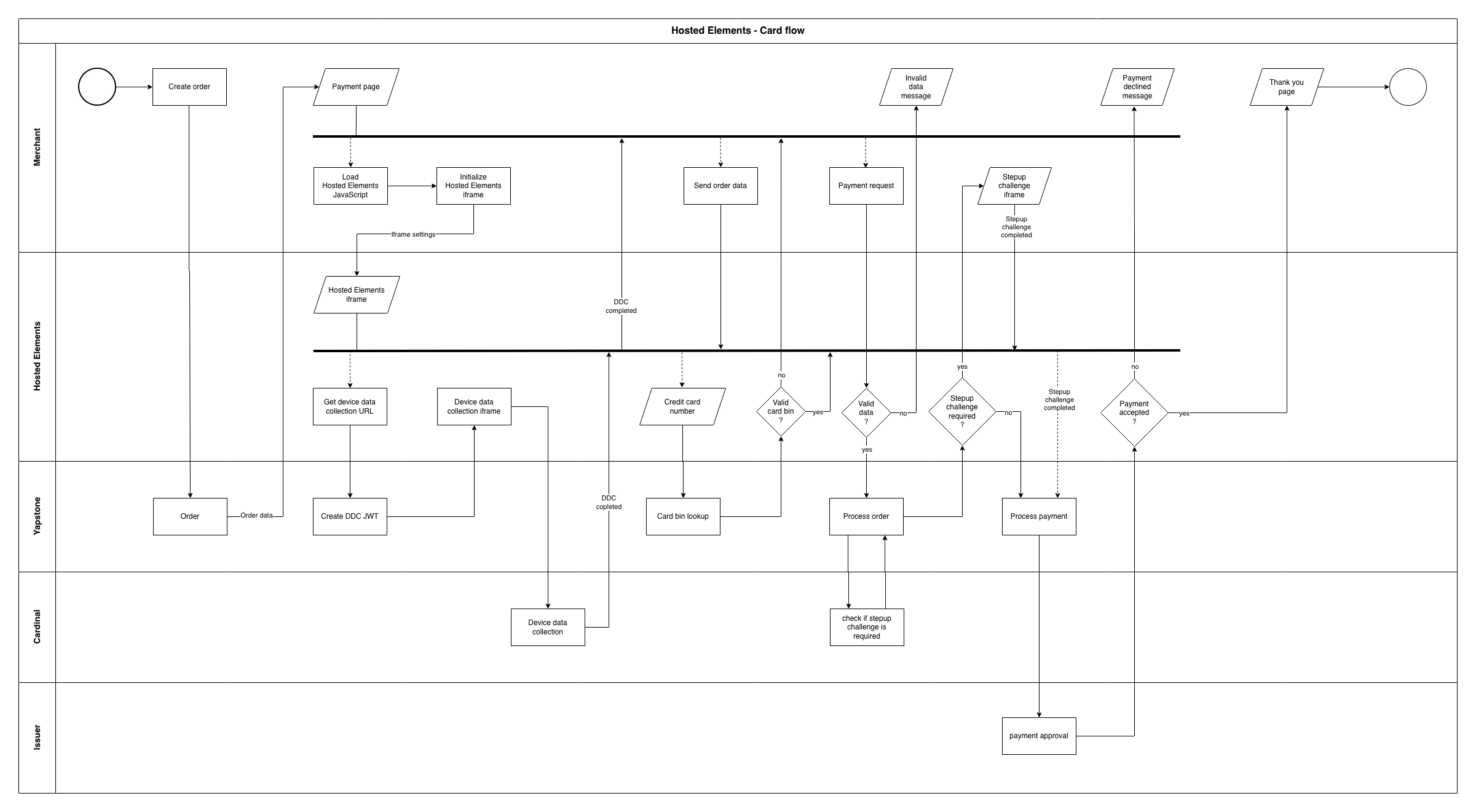
Demo URL
https://merchant.elements.pay.demo.yapstone.com
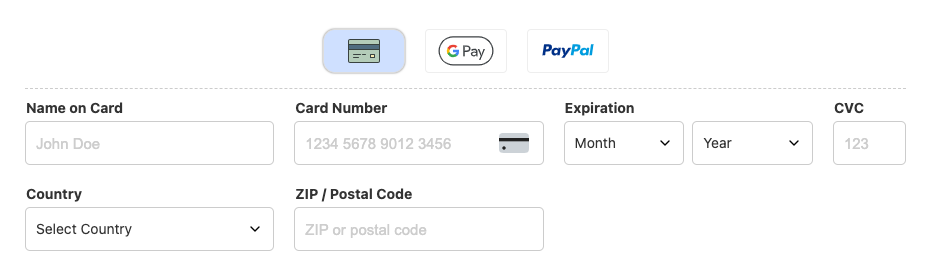
Prerequisites
Before starting the integration, you must have the following
-
Credentials (username and password)
-
Property code
1 - Create an order
An order must be created from the Merchant's back-end before the Hosted Elements iframe can be initialized.
The response for the order creation will return the order ID, that will be required in the next steps.
The default timeout for the order is 10 minutes but it can be set to any integer value greater or equal to 5.
The order ID can be used only once and if expired, another order will have to be created, and the payment process restarted.
Authorization
Base 64 encoded username and password.
JavaScript example: btoa(`${username}:${password}`)
Idempotency-key
An UUID v4 string, used to avoid the same request to be sent multiple times.
CURL example to create an order:
curl -X POST "https://api.pay.demo.yapstone.com/v1/hosted-elements/orders" \
  -H "Authorization: Basic <BASE64CREDENTIALS==>" \
  -H "Idempotency-key: <UUID>" \
  -H "Content-Type: application/json" \
  -d '{
    "maxPaymentAttempts": 1,
    "orderDetails": {
        "orderType": "SHORT_TERM_PROPERTY_RENTAL",
        "shortTermPropertyRental": {
            "platform": "HRP",
            "propertyCode": "<PROPERTYCODE>"
        }
    },
    "orderTimeoutMinutes": 15,
    "paymentMethodsAccepted": [
        "VISA_CREDIT_CARD",
        "MASTERCARD_CREDIT_CARD",
        "DEBIT_CARD"
    ],
    "transactionDetails": {
        "customerStatementReference": "REF",
        "installmentNumber": 1,
        "preAuthorization": false,
        "totalInstallments": 1
    },
    webhooks: {
        callbackUrl: "https://example.com/webhook",
        signingKey: "f2d3cb1b4e8366d85e5f31d3e16a07c7"
    }
}'
Successful response example (http response status code 200)
{
    "orderId": "40a7dfa9-f895-4a41-8ced-249cd3893e6d",
    "expiresAt": "2026-01-28T09:47:35.115810105Z",
    "paymentMethodsAvailable": [
        "VISA_CREDIT_CARD",
        "MASTERCARD_CREDIT_CARD",
        "DEBIT_CARD"
    ]
}
Error response example (http response status code 400)
{
    "errors": [
        {
            "code": "Invalid property code",
            "message": "Invalid property code: <PROPERTYCODE>",
            "location": null
        }
    ],
    "correlationId": "e5d240ab-f84a-421a-b624-1d3f8960f7ab",
    "httpStatusCode": 400
}
2 - Call Hosted Elements JavaScript and initialize the iframe
To initialize the iframe, pass the html element id where the iframe should appear, followed by the configuration object.
HTML example:
<html>
...
<script src="https://elements.pay.demo.yapstone.com/yapstone.js"></script>
<script>
    Yapstone.init('iframe-container', // html element id to render the iframe
    {
        orderId: 'd74a1c97-a17b-49f7-8493-4222c9743f2a', // Required order ID
        orderTotal: 29999, // Required order total. Must be an integer (can be updated later)
        orderCurrency: 'EUR', // Required currency code (GBP, EUR, USD or CAD)
        defaultPaymentMethod: 'card', // Optional default payment method
        customPaymentMethods: ['paypal'], // Optional predefined array of custom payment methods
        mainCountries: ['GB', 'US'], // Optional array of countries to appear first in the countries dropdown
        dropdownStyle: 'custom', // Optional dropdown style (custom or native). The default value is custom
        digitalWallets: {'google-pay': 'Google Pay', 'apple-pay': 'Apple Pay'}, // Optional object of digital wallets
        hideAddressFields: true, // Optional boolean to hide the address fields (country, state/province and postcode)
        css: { // Optional CSS for iframe customization }
    });
</script>
<body>
  ...
  <div id="iframe-container"></div>
  <button id="process-payment-button">Pay now</button>
  ...
</body>
</html>
orderTotal must be an integer value. For example, if the total is 299.99, it must be passed as 29999.
orderCurrency accepts one of the values: GBP, EUR, USD or CAD.
defaultPaymentMethod can be card, google-pay, apple-pay or a predefined custom payment method.
customPaymentMethods can be a predefined custom payment method. Currently, only paypal is available.
mainCountries is an array of two letter country codes that will appear first in the country dropdown.
dropdownStyle can be custom or native. The default value is custom.
digitalWallets is an object of valid digital wallets to be accepted as payment method. Currently, only Google Pay™ and Apple Pay are available. Example object: {'google-pay': 'Google Pay', 'apple-pay': 'Apple Pay'}
hideAddressFields will flag if the fields country, state/province and postcode should be visible in the iframe. Please notice that if the fields are not visible, the page needs to pass those values accordingly or the payment will be rejected. The default value is false.
css is optional and the example below shows all the options available
CSS properties will be sanitized in order to avoid security risks and any property not listed in the example code will be discarded.
The non standard CSS properties are used to represent pseudo-classes (active, hover and focus) and pseudo-elements (placeholder).
CSS options with default values
{
    form: {
        width: '100%',
        height: '100%',
        fontFamily: 'system-ui, sans-serif',
        fontSize: '14px',
        fontWeight: 'normal',
        color: '#333',
        backgroundColor: '#fff',
        paddingTop: '5px',
        paddingRight: '5px',
        paddingBottom: '5px',
        paddingLeft: '5px',
        marginTop: '0',
        marginRight: '0',
        marginBottom: '0',
        marginLeft: '0'
    },
    paymentMethods: {
        height: '44px',
        marginBottom: '10px',
        paddingTop: '5px',
        paddingRight: '0',
        paddingBottom: '15px',
        paddingLeft: '0',
        columnGap: '20px',
        borderBottomWidth: '1px',
        borderBottomStyle: 'dashed',
        borderBottomColor: '#ccc',
        button: {
            width: '82px',
            height: '44px',
            backgroundColor: '#fff',
            borderWidth: '1px',
            borderStyle: 'solid',
            borderColor: '#eee',
            borderRadius: '4px',
            cursor: 'pointer',
            transition: 'all 200ms ease-in-out',
            selected: {
                backgroundColor: '#cfe0ff',
                borderWidth: '1px',
                borderStyle: 'solid',
                borderColor: '#ddd',
                borderRadius: '4px',
                boxShadow: '0 0 2px 0 rgba(0,0,0,0.5)',
                hover: {
                    borderStyle: 'solid',
                    borderRadius: '4px',
                    borderColor: '#ddd'
                }
            },
            hover: {
                backgroundColor: '#fff',
                borderWidth: '1px',
                borderStyle: 'dashed',
                borderColor: '#aaa',
                borderRadius: '12px',
                boxShadow: 'none'
            }
        }
    },
    label: {
        color: '#333',
        fontSize: '14px',
        fontWeight: 'bold',
        marginTop: '0',
        marginRight: '0',
        marginBottom: '2px',
        marginLeft: '1px'
    },
    input: {
        width: '100%',
        height: '44px',
        lineHeight: '42px',
        color: '#333',
        backgroundColor: '#fff',
        fontSize: '15px',
        fontWeight: 'normal',
        borderWidth: '1px',
        borderStyle: 'solid',
        borderColor: '#ccc',
        borderRadius: '5px',
        paddingTop: '0',
        paddingRight: '10px',
        paddingBottom: '0',
        paddingLeft: '10px',
        marginTop: '5px',
        marginRight: '0',
        marginBottom: '0',
        marginLeft: '0',
        focus: {
            outlineWidth: '2px',
            outlineStyle: 'solid',
            outlineColor: '#008cba',
            outlineOffset: '0',
            color: '#333',
            backgroundColor: '#efefef'
        },
        invalid: {
            outlineWidth: '2px',
            outlineStyle: 'solid',
            outlineColor: '#ed4337',
            outlineOffset: '0'
        },
        placeholder: {
            color: '#cdcdcd',
            opacity: '1'
        },
        cardLogo: {
            width: '40px',
            height: '40px',
            top: '7px',
            right: '10px'
        }
    },
    select: {
        paddingTop: '0',
        paddingRight: '10px',
        paddingBottom: '0',
        paddingLeft: '8px'
    },
    dropdown: {
        width: '100%',
        height: '44px',
        lineHeight: '42px',
        color: '#333',
        backgroundColor: '#fff',
        fontSize: '15px',
        fontWeight: 'normal',
        borderWidth: '1px',
        borderStyle: 'solid',
        borderColor: '#ccc',
        borderRadius: '5px',
        paddingTop: '0',
        paddingRight: '0',
        paddingBottom: '0',
        paddingLeft: '0',
        marginTop: '5px',
        marginRight: '0',
        marginBottom: '0',
        marginLeft: '0',
        caret: {
            width: '16px',
            height: '16px',
            marginTop: '0',
            marginRight: '0',
            marginBottom: '0',
            marginLeft: '10px'
        },
        selected: {
            width: '100%',
            backgroundColor: '#fff',
            borderWidth: '1px',
            borderStyle: 'solid',
            borderColor: '#ccc',
            borderRadius: '5px',
            paddingTop: '0',
            paddingRight: '10px',
            paddingBottom: '0',
            paddingLeft: '10px'
        },
        options: {
            backgroundColor: '#fff',
            maxHeight: '152px',
            maxWidth: 'calc(100% + 4px)',
            left: '-2px',
            right: 'auto',
            zIndex: '10',
            cursor: 'pointer',
            borderWidth: '1px',
            borderStyle: 'solid',
            borderColor: '#ccc',
            borderRadius: '5px',
            boxShadow: '0 0 5px 0 rgba(0,0,0,0.5)',
            option: {
                width: '100%',
                height: '30px',
                lineHeight: '30px',
                color: '#333',
                backgroundColor: '#fff',
                cursor: 'pointer',
                fontSize: 'inherit',
                fontWeight: 'normal',
                paddingTop: '0',
                paddingRight: '10px',
                paddingBottom: '0',
                paddingLeft: '10px',
                active: {
                    color: 'inherit',
                    backgroundColor: '#dedede',
                    fontSize: 'inherit',
                    fontWeight: 'bold'
                },
                hover: {
                    color: 'inherit',
                    backgroundColor: '#cdcdcd',
                    fontSize: 'inherit',
                    fontWeight: 'inherit'
                }
            }
        }
    }
}
JavaScript example:
(function () {
    const yapstoneUrl = 'https://elements.pay.demo.yapstone.com';
    document.addEventListener('DOMContentLoaded', () =>
    {
        // Payment button
        const payButton = document.getElementById('process-payment-button');

        // Listen for clicks on the payment button
        payButton.addEventListener('click', (e) => {
            e.preventDefault();
            payButton.disabled = true;
            payButton.innerText = 'Please wait...';
            Yapstone.setData({firstName: "John"}); // Send the user's first name to the iframe
            Yapstone.setData({lastName: "Doe"}); // Send the user's last name to the iframe
            Yapstone.setData({email: "johndoe@gmail.com"}); // Send the user's email address to the iframe
            Yapstone.prefillData('country', 'US'); // Send the user's country two letter code to the iframe
            Yapstone.prefillData('state', 'CA'); // Send the user's state/province two letter code to the iframe. Required when the country is US or CA
            Yapstone.prefillData('postcode', '90012'); // Send the user's postcode to the iframe
            Yapstone.setOrderTotal(cartTotal * 100); // Send the order total, as integer, to the iframe
            Yapstone.sendMessageToIframe({ type: 'action', value: 'submit' }); // Send message to the iframe to start processing the payment
        });

        // Listen for messages from the iframe
        window.addEventListener('message', (event) => {
            if (event.origin === yapstoneUrl || event.origin === window.location.origin) {
                const message = event.data;
                if (message.type) {

                    // Error messages from iframe
                    switch (message.type) {
                        // Received when the iframe is initialized without the required data
                        case 'error':
                            payButton.disabled = false;
                            payButton.innerText = 'Pay now';
                            break;

                        // Info messages from iframe
                        case 'yapstone':
                            switch (message.msg) {

                                // Received when the digital wallet payment was canceled or failed
                                case 'payment-canceled':
                                    // console.log(message.data);
                                    payButton.disabled = false;
                                    payButton.innerText = 'Pay now';
                                    break;

                                // Received when one or more required fields is empty or has invalid data
                                case 'validation-errors':
                                    // console.error(message.data);
                                    payButton.disabled = false;
                                    payButton.innerText = 'Pay now';
                                    break;

                                // Everything was completed and the payment was accepted
                                case 'orderAuthenticated':
                                    window.location.replace('/thank-you.html');
                                    break;

                                // Something went wrong and the payment was declined
                                case 'orderAuthenticationFailed':
                                    showValidationPopup('Payment declined');
                                    break;

                                // Payment method changed
                                case 'payment-method':
                                    if (message.data.paymentMethod === 'paypal') {
                                        // Process custom payment method with PayPal
                                    }
                                    break;
                            }
                            break;

                        // CSS changes
                        case 'css':
                            switch (message.msg) {
                                // Received when the iframe is initialized
                                case 'iframe-size':
                                    //console.log(`Width: ${message.data.width}px, height: ${message.data.height}px`);
                                    break;
                                // Received every time the iframe is resized
                                case 'iframe-resized':
                                    //console.log(`Iframe resized. Width: ${message.data.width}px, height: ${message.data.height}px`);
                                    break;
                            }
                            break;

                        // Data changes
                        case 'data':
                            switch (message.msg) {
                                // Received every time the country is changed
                                case 'country-changed':
                                    //console.log(`Country changed! Name: ${message.data.name}, code: ${message.data.code}`);
                                    break;
                                // Received every time the state/province is changed
                                case 'state-changed':
                                    //console.log(`State changed! Name: ${message.data.name}, code: ${message.data.code}`);
                                    break;
                            }
                            break;
                    }
                }
            }

        });
    });
})();
The above html and javascript code are the only code required in order to use the hosted elements.
When the user clicks on the pay now button, the page must pass the following data to the iframe:
-
firstName: Yapstone.setData({firstName: "John"})
-
lastName: Yapstone.setData({lastName: "Doe"})
-
email: Yapstone.setData({email: "johndoe@gmail.com"})
-
country: Yapstone.prefillData('country', 'US')
-
state: Yapstone.prefillData('state', 'CA') - Only required if the country is US or CA
-
postcode: Yapstone.prefillData('postcode', '90012')
-
Order total: Yapstone.setOrderTotal(cartTotal * 100) (must be passed even if the order total did not change since the iframe was initialized)
-
Start the payment process: Yapstone.sendMessageToIframe({ type: 'action', value: 'submit' })
3 - Device data collection
Once initialized, the iframe will start the device data collection and can notify the Merchant when the process finished, as to avoid payment submission before the device data collection is completed.
4 - Step-up challenge
Once the user finished to fill in all the payment information and clicks on the payment button, the iframe will make an API call to determine if a step-up challenge is required.
If a challenge is required, the corresponding UI will be presented and the user can complete the challenge.
If a challenge is not required, the iframe will send a message to the Merchant page notifying the payment is completed.
5 - Validation
All fields in the iframe are required.
The card number validation is done via card type, Luhn algorithm and card bin lookup.
State/Province is required when the selected country is US or CA.
The postal code validation is done based on the selected country rules for postal codes.
6 - Error handling
The iframe will send a message to the Merchant page with all the fields that failed validation.
7 - Google Pay™
To enable GooglePay™, all merchants must adhere to the Google Pay™ APIs Acceptable Use Policy and accept the terms defined in the Google Pay™ API Terms of Service.
Google Pay™ is enabled by default for all merchants, requiring no manual activation. To control its visibility, include or omit the Google Pay™ flag within the digitalWallets option. This allows to easily manage available payment methods inside the iframe, as shown in the example code below.
In order to accept Google Pay™, initialize the iframe adding {'google-pay': 'Google Pay'} to digitalWallets option, as in the example below.
<html>
...
<script src="https://elements.pay.demo.yapstone.com/yapstone.js"></script>
<script>
    Yapstone.init('iframe-container', // html element id to render the iframe
    {
        // For full options, check the HTML example at the beginning of this document.
        digitalWallets: {'google-pay': 'Google Pay'}
    });
</script>
<body>
  ...
  <div id="iframe-container"></div>
  <button id="process-payment-button">Pay now</button>
  ...
</body>
</html>
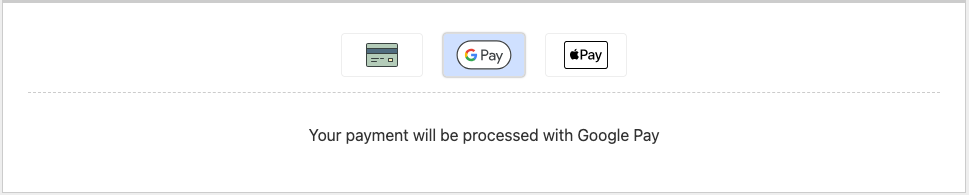
When a user selects Google Pay™ as their payment method, the Google Pay™ payment sheet is presented, allowing them to select their preferred card. Our platform supports both PAN_ONLY and CRYPTOGRAM_3DS authentication methods.
When using PAN_ONLY, a 3D Secure (3DS) device data collection process runs automatically to secure the transaction. If a step-up challenge is required, the 3DS UI will be displayed, allowing the user to complete the authentication just as they would for a standard credit card payment.
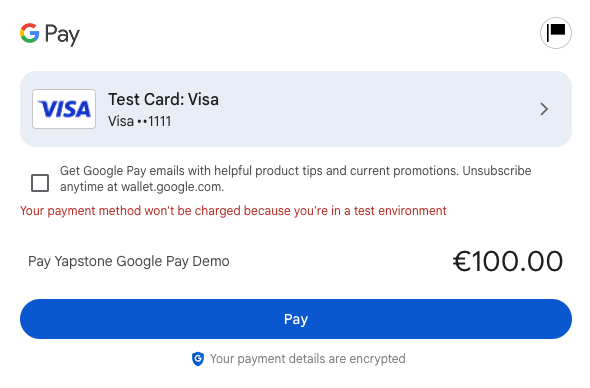
Once the user confirms the transaction, the Google Pay™ API returns a PaymentData object. This response contains an encrypted payload which is securely transmitted to Yapstone for decryption and the generation of a unique payment token.
Prior to submitting the payment processing request, the Device Data Collection (DDC) iframe is initialized and processed to enhance fraud detection. During the submission of the payment request, if a step-up challenge (such as 3D Secure) is required, the user will be presented with the corresponding authentication interface. The user must successfully complete this challenge to proceed.
If the user dismisses the Google Pay™ payment sheet or if the transaction fails for any reason, an error event will be dispatched to the host page to allow for graceful error handling.
8 - Sending data to the iframe
To send required data to the iframe, call the functions Yapstone.setData({key: value}) and Yapstone.prefillData(key, value) as in the example below:
<script>
  // Required data
  Yapstone.setData({firstName: "John"});
  Yapstone.setData({lastName: "Doe"});
  Yapstone.setData({email: "johndoe@gmail.com"});
  Yapstone.prefillData('country', 'US');
  Yapstone.prefillData('state', 'CA'); // Only required if the country is US or CA
  Yapstone.prefillData('postcode', '90012');
</script>
Note: when sending the total via Yapstone.setOrderTotal(), the amount must be converted to integer.
<script>
  Yapstone.setOrderTotal(29999); // Integer value for 299.99
</script>
9 - Examples of messages received from the iframe
Payment method selected - Google Pay™
{
    "type": "yapstone",
    "msg": "payment-method",
    "data": {
        "paymentMethod": "google-pay",
        "orderId": "bdf64b14-6a19-49fd-84f6-441c9803c27f"
    }
}
Custom payment method selected - PayPal
{
    "type": "yapstone",
    "msg": "payment-method",
    "data": {
        "paymentMethod": "paypal",
        "orderId": "bdf64b14-6a19-49fd-84f6-441c9803c27f"
    }
}
10 - Webhook payload example
Order approved
{
    "eventDate": "2025-10-15T08:38:42.811756784Z",
    "eventType": "ORDER_APPROVED",
    "orderId": "a5b4d172-a19b-48ff-8505-03b2c27a3d23",
    "currentPaymentAttempt": 1,
    "maxPaymentAttempts": 1,
    "paymentType": "CARD",
    "additionalPaymentInformation": {
        "cardDetails": {
            "cardExpiryMonth": "01",
            "cardExpiryYear": "2028",
            "cardLastDigits": "2503"
        }
    },
    "paymentAmount": {
        "value": 12300,
        "currency": "EUR"
    },
    "paymentReferenceNumber": "12414398:47",
    "billingAddress": {
        "line1": "na",
        "city": "na",
        "countyOrProvince": "na",
        "zipOrPostcode": "M1 1AA",
        "country": "GB"
    }
}
Order timed out
{
    "eventDate": "2025-10-15T15:18:08.005323826Z",
    "eventType": "ORDER_TIMEOUT",
    "orderId": "27d093a4-674f-4fb3-90f8-b326ef02195f",
    "maxPaymentAttempts": 1,
    "paymentType": null,
    "paymentAmount": null
}
Payment declined
{
    "eventDate": "2025-10-15T16:00:13.552285399Z",
    "eventType": "PAYMENT_DECLINED",
    "orderId": "d8ac811e-8406-4123-88c9-329ac69a1532",
    "currentPaymentAttempt": 1,
    "maxPaymentAttempts": 1,
    "paymentType": "CARD",
    "additionalPaymentInformation": {
        "cardDetails": {
            "cardExpiryMonth": "05",
            "cardExpiryYear": "2029",
            "cardLastDigits": "2925"
        }
    },
    "paymentAmount": {
        "value": 11100,
        "currency": "EUR"
    },
    "billingAddress": {
        "line1": "void",
        "city": "void",
        "countyOrProvince": "void",
        "zipOrPostcode": "M1 1AA",
        "country": "GB"
    },
    "errorCode": "E3000",
    "errorDescription": "The provided payment method has failed authentication. Please try again or use a different card."
}
11 - Legal/Compliance
Google Pay™ is a trademark of Google LLC